How to Send Items Through CubaMax
Sending items through CubaMax is a simple process. Follow these steps to prepare your items and arrange for shipment.
Step 1: Create Your CubaMax Account
The first time you send a package through CubaMax, you will need to create an account. Bring your driver’s license with you to set up your account.
You will also need the following information for the pastor who will receive the package:
Pastor’s full name
Address
Phone number
ID/Carnet number
Good news: Once your account has been created, you will not need to provide this information every time you ship a package. If you have more than one partner church or pastor, you can also add additional recipients to your account, making it easier to send packages to different churches in the future.
Step 2: Bring Your Items to CubaMax
I recommend weighing your items at home beforehand.
Once your account is set up, bring the items you would like to send to a CubaMax location.
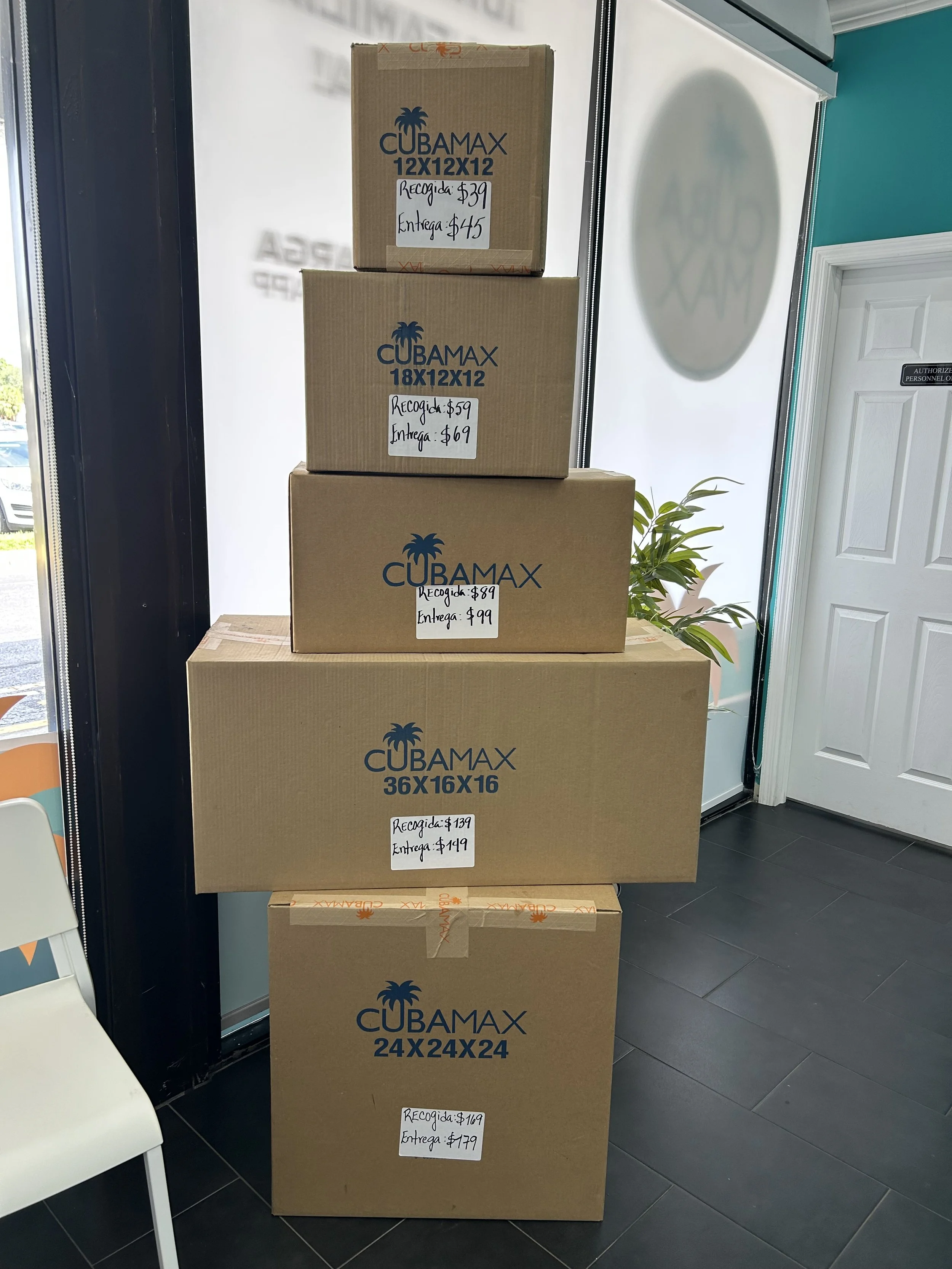
CubaMax provides shipping boxes in different sizes. The photo shows the available box sizes and their prices. Be sure to choose the option that includes delivery directly to the pastor or church. Otherwise, the recipient will have to pick up the package at a CubaMax location.
Choose the box size that best fits the items you are sending.
Step 3: Pack Your Box
Place your items into the CubaMax shipping box.
Once the box is full and ready to ship, a CubaMax employee will weigh the package and calculate the shipping cost by the pound. The current rate is $2.00 per pound.
Note: Some items, such as auto parts, tools, and electronics, are shipped at a different rate, currently $2.50 per pound. For these items, you will need to provide your own box.
Step 4: Pay for Your Shipment
After your box has been weighed, you will pay the shipping cost.
I recommend paying in cash, if possible, because CubaMax charges an additional fee for credit card payments.
Step 5: Keep Your Receipt
After you pay, you will receive a receipt with important information about your shipment.
Your receipt will include:
Date and time of the transaction
Your information
Recipient’s name and address
Package weight
Total cost
Keep your receipt until the package has been delivered.
Step 6: Track Your Package
After your shipment has been processed, you should receive a text message with a tracking link. The message may look something like:
“{Insert Name}, now you can track your package with CubaMax in real time. Click here —”
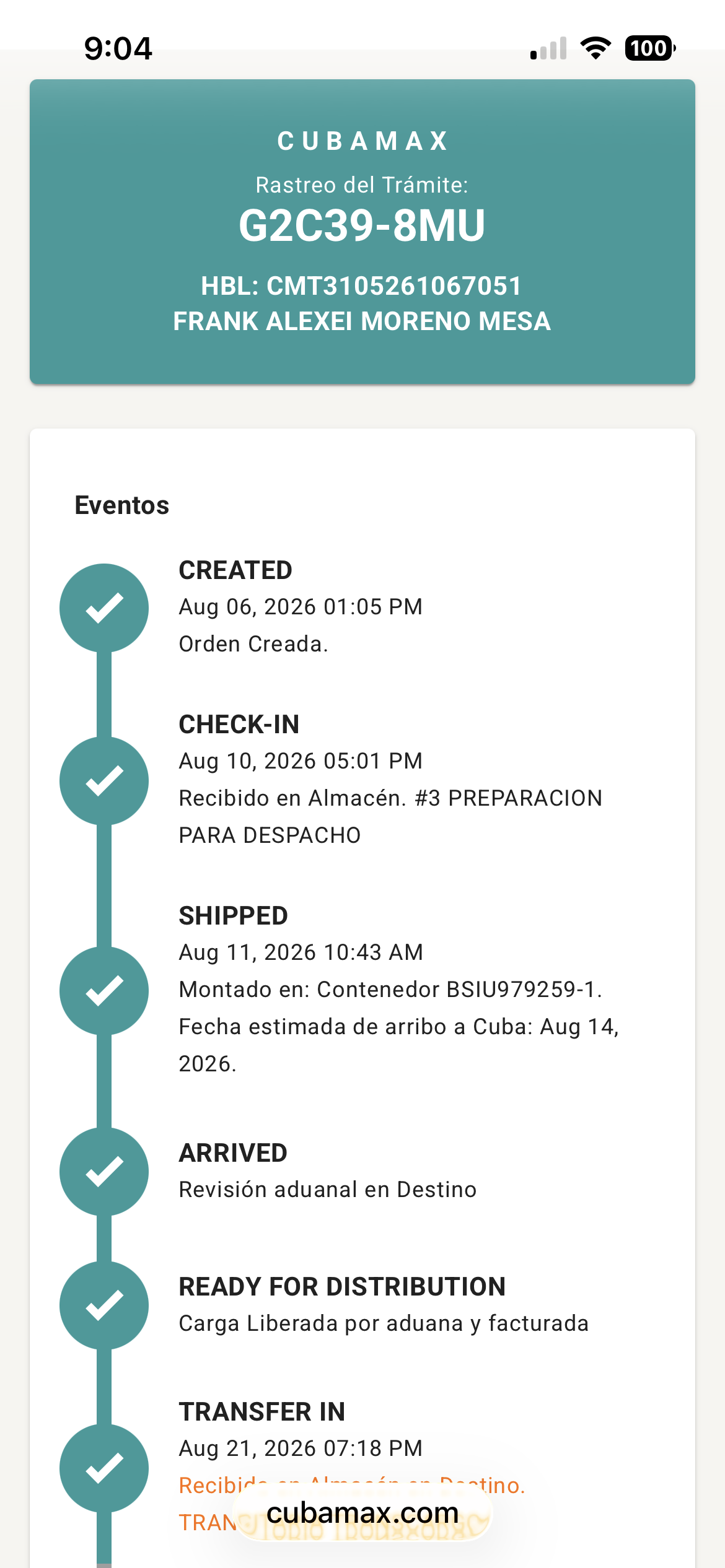
It is safe to click the blue link in the message. This will take you to your package’s tracking information, where you can see its various shipping events and the status of the delivery.
The tracking feature is very helpful because you can monitor the package as it moves from one location to another and follow its progress until delivery.
Step 7: Notify the Pastor When the Package Is Out for Delivery
I usually monitor the tracking information and, once the package shows “Out for Delivery,” I take a screenshot of the tracking status and send it to the pastor.
This lets the pastor know that the package is on its way and should arrive soon.
Quick Summary
Create your CubaMax account using your driver’s license.
Have the pastor’s full name, address, phone number, and ID/Carnet number ready.
Add additional pastors if you ship to more than one partner church.
Bring your items to CubaMax.
Choose the appropriate CubaMax shipping box.
Pack your items into the box.
Pay the shipping cost by the pound once the box is weighed.
Consider paying in cash to avoid the additional credit card fee.
Keep your receipt.
Watch for the CubaMax tracking text message.
Use the blue link to track your package.
Send the pastor a screenshot when the package is marked “Out for Delivery.”